Access to the token is based on a PIN code. The code is printed in the letter received from certSIGN (see example here).
For security reasons, it is recommended that you change the PIN code as soon as you receive the device by following the steps below.
1. Connect your Athena device to the computer.
2. Click on Start, select All Programs, choose IDProtect Client and then click on IDProtect Manager.
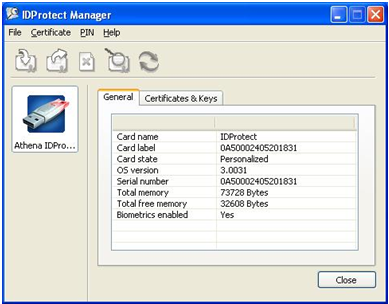
3. In the IDProtect Manager window, click on Certificates & Keys.
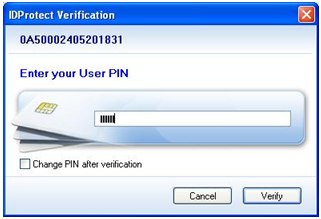
4. In the next window, enter your PIN code and click on Verify.
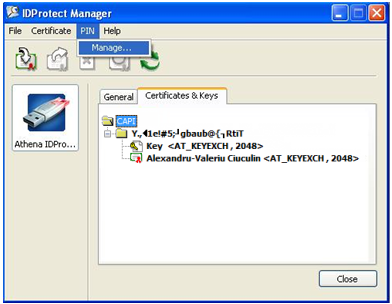
5. After typing in your PIN code, your certificate will be displayed in the IDProtect Manager window. From the top menu of the window, select PIN (as shown in the image below) and then choose Manage.
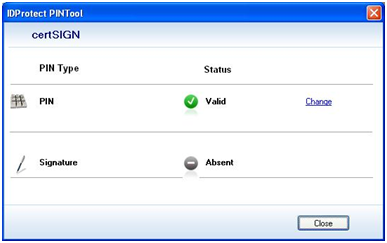
6. In the next window, choose Change.
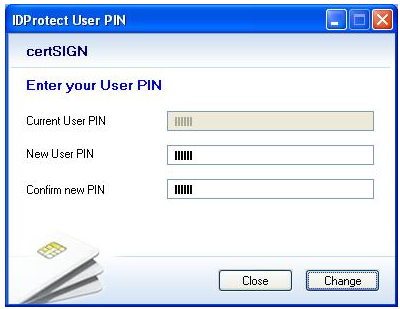
7. Enter the current password of the device (the one printed in the letter you received from certSIGN), in the field Current User PIN.
8. Enter the new password (at least 6 characters) in the following fields: New User PIN and Confirm new PIN; then click on Change.
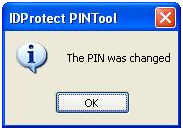
9. In the next window, click the OK button.