



Installation of ROOT certSIGN 2023
To install the root certificate of the issuing authority certSIGN ROOT CA SIGN 2023 RSA in Windows follow the steps below:
1. Download the certificate using the following link: https://crl.certsign.ro/certsign-rootcasign2023rsa.crt
2. Go to the saved certSIGN ROOT CA SIGN 2023 RSA.crt file, press Open to open the wizard and then Install Certificate… to start the installation.

3. Choose Current User as installation location and press Next.

4. Check the check box Place all certificates in the following store, choose Trusted Root Certification Authorities as your store, then press OK.

5. The store where the certificate is installed appears in the Certificate store field. Press Next to continue the installation.

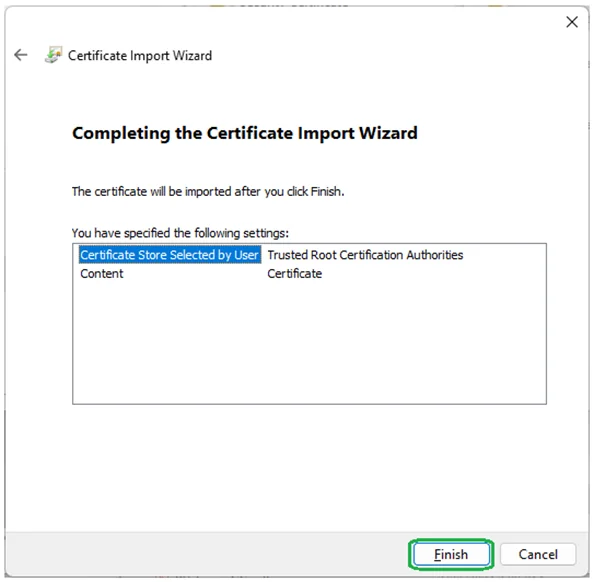
6. Press Finish to complete the installation.
7. To accept the import press the Yes button in the installation information presented by Windows through the Security Warning window.

8. Press the OK button to close the installation wizard.

